application · Jul 8, 2026
Building Spreadsheet-Powered Financial Reporting Applications with Java
 James Chu
Developer, Keikai.
James Chu
Developer, Keikai.
Building Spreadsheet-Powered Financial Reporting Applications with Java
How Keikai Spreadsheet and ZK help teams turn spreadsheet-based financial reporting into a controlled Java web application workflow.
Introduction
Financial reporting teams still rely on spreadsheets for a practical reason: spreadsheets match the way finance, accounting, and actuarial specialists think about numbers. Users can inspect assumptions, formulas, source rows, intermediate calculations, and final outputs without reading application code.
The challenge begins when those spreadsheets become part of a regulated or repeatable reporting process. For month-end closing, regulatory reporting, IFRS reporting, or internal financial review, organizations need more than a shared Excel file. They need version control, validation, traceability, review steps, controlled exports, and a reliable way to connect spreadsheet logic with backend systems.
Many teams respond by moving formulas out of Excel and rewriting the logic in Java. That gives IT more control, but it can also move business-owned calculation logic away from the people who understand it best. Other teams keep the process in desktop spreadsheets, but then struggle with local copies, inconsistent review steps, and weak auditability. File-processing libraries can support import and export, but they do not provide a live spreadsheet UI inside a web application.
Keikai Spreadsheet supports a different approach: keep the spreadsheet interaction model, but run the workflow inside a Java web application. Users work with a familiar Excel-like UI in the browser, while the application controls validation, calculation, sheet visibility, review actions, output generation, and integration with downstream systems.
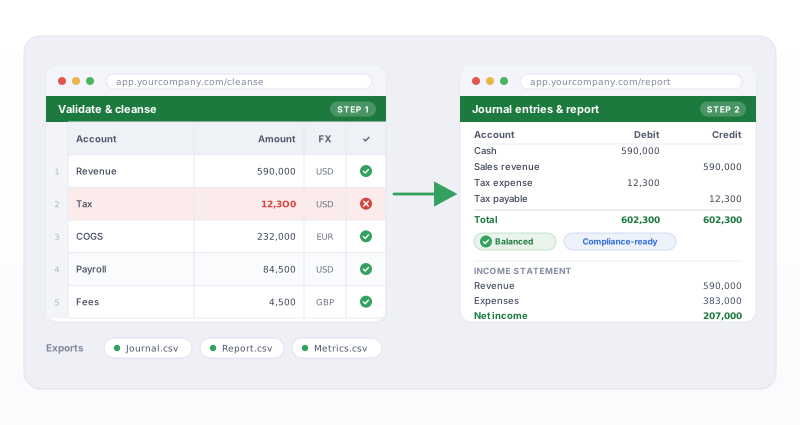
This article uses two Keikai demos to illustrate the pattern. The Financial Data Cleansing demo shows how users can validate and correct source financial data with spreadsheet-managed ETL rules. The Financial Reporting demo shows how the application can generate journal entries, report impact tables, and export-ready CSV sheets from editable policy assumptions and journal rules.
The scenario is inspired by a real-world IFRS reporting project, but the same architecture applies to many spreadsheet-driven financial workflows, including accounting close processes, actuarial review, ERP import staging, and internal management reporting.
From Spreadsheet File to Governed Application Surface
The key design shift is to stop treating the workbook as an uncontrolled file attachment. In a Keikai-based application, the workbook becomes both a business-facing user interface and a controlled runtime artifact.
At a high level, the workflow can be described as:
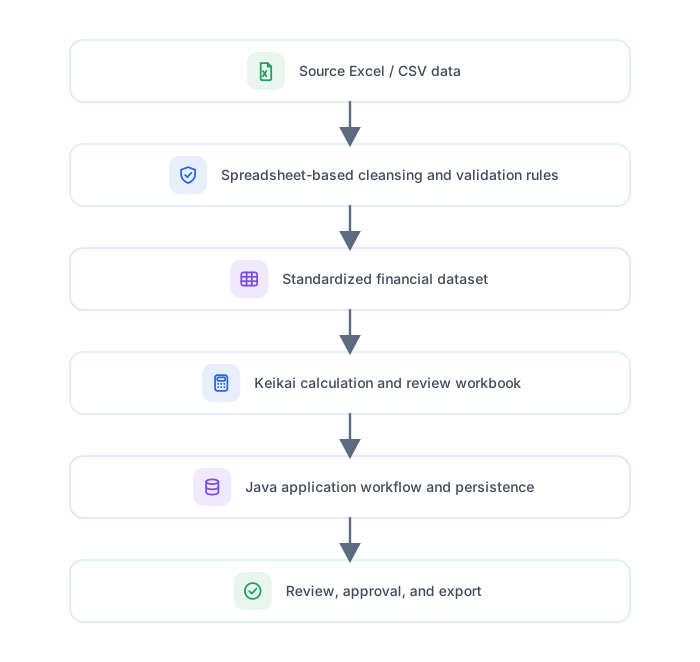
Figure 1. A governed spreadsheet workflow from source data to reviewable financial reporting outputs.
The spreadsheet remains visible and editable where it helps business users. They can inspect source rows, correct values, adjust assumptions, maintain rule tables, and review generated outputs. At the same time, the surrounding Java application decides when validation runs, how calculation is triggered, which sheets are visible, what actions are available, and how final results are exported or persisted.
This separation is the core of the pattern. Finance can continue to own the meaning of formulas, assumptions, and rules. IT can own execution, access control, persistence, workflow, and integration. The workbook becomes a shared contract between the business model and the application.
Stage 1: Cleansing Financial Data Before Reporting
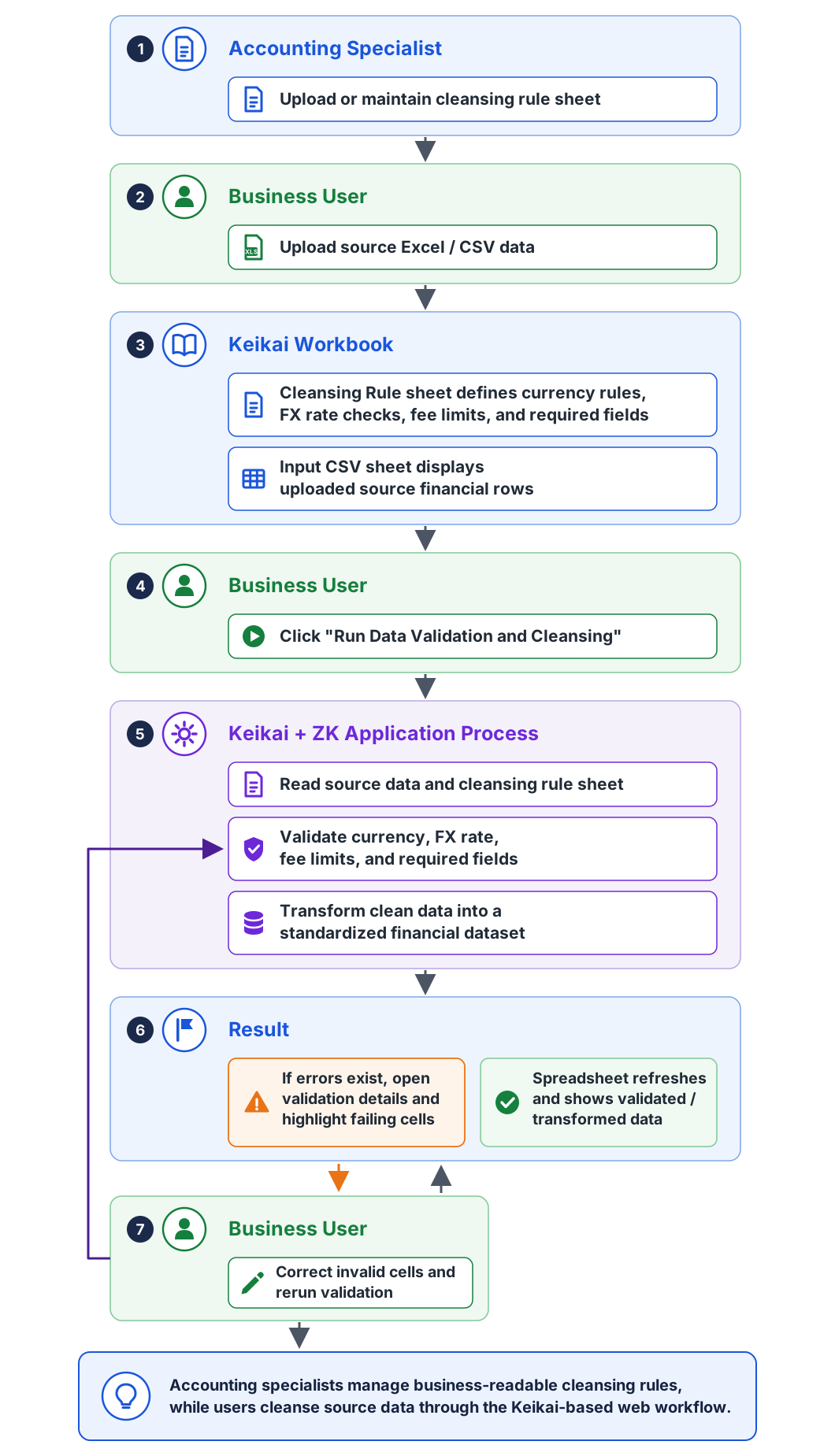
The Financial Data Cleansing demo starts from a common reporting problem: source data arrives in a tabular format, but it is not ready for reporting. A currency value may be inconsistent, an FX rate may be missing, or a service fee may violate a business rule. In a traditional workflow, users often download a file, fix it in Excel, upload it again, and repeat the process until the data passes validation.
With Keikai, that correction loop can happen directly inside the web-based financial reporting tool.
You can try this workflow in the Keikai Financial Data Cleansing demo, which demonstrates spreadsheet-based validation rules, error highlighting, and correction inside the browser.
The demo displays an Input CSV sheet where users can review and edit source-like financial data in the browser. Beside it, an ETL Rule sheet stores validation rules in a business-readable spreadsheet table. The rules define checks such as allowed currency values, required positive FX rates, and service fee limits.
The page embeds the spreadsheet with a standard ZUL component:
<spreadsheet id="etlSpreadsheet"
             width="100%" vflex="1"
             src="/WEB-INF/books/ifrs_investment_contract_close.xlsx"
             showSheetbar="false"
             showToolbar="false"
             showFormulabar="true"/>
From the user's point of view, this feels like editing a spreadsheet. From the application's point of view, it is a controlled validation workflow. When the user clicks Run Data Validation and Cleansing, the Java composer reads the current input rows, reads the rule sheet, validates the data, and reports any problems back to the UI.
In the demo data, one row intentionally uses NT as the currency value. The rule sheet expects NTD or USD, so validation fails. The application opens a validation detail window, shows the affected policy, field, current value, issue, and required action, and lets the user jump directly to the failing cell. After the user corrects the value to NTD, the process can be run again. This time, validation passes and the application produces the transformed reporting data.
That loop is simple, but it demonstrates an important product experience. Users do not need to leave the system, edit a local copy, and upload another file. Validation, correction, and transformation all happen in one browser-based spreadsheet UI.
The rules are not hidden from business users either. They remain visible as spreadsheet data. In a production system, those rules would normally be governed through template review and release control, but they can still remain readable and maintainable in a format finance users already understand.
Stage 2: Generating Journal Entries and Reporting Outputs
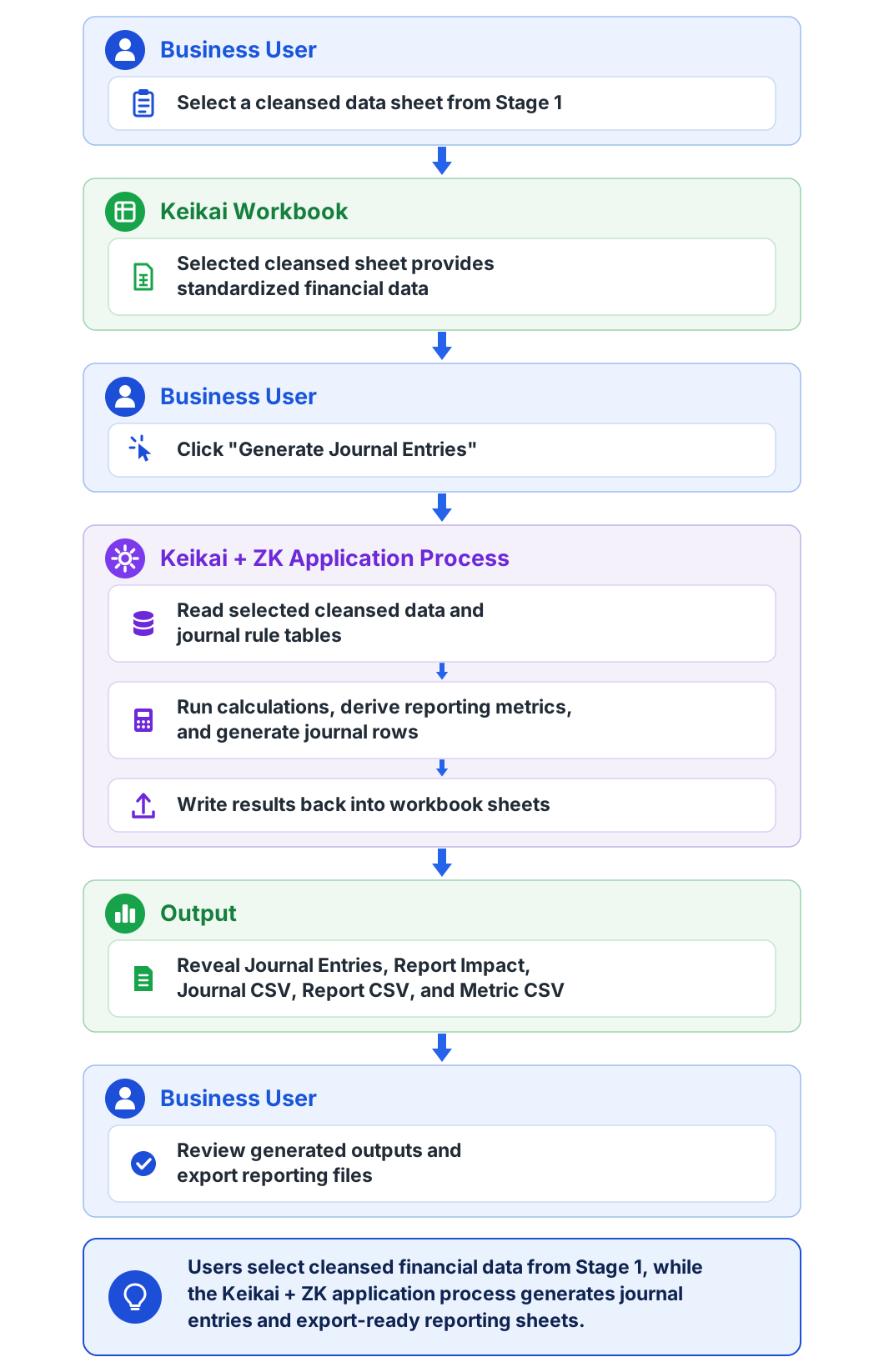
After the source data is clean, the next step is to produce reporting outputs. The Financial Reporting demo shows how the same spreadsheet-based application pattern can support journal generation and reporting review.
The complete workflow is available in the Keikai Financial Reporting demo, where users can select cleansed financial data, generate journal entries, review report impact, and export reporting CSV files.
The demo uses a Stage2_Policy sheet as the main input area. Users can review policy assumptions such as premium total, service fee, account value, and FX rate. The same workbook also contains journal rules that map accounting events to calculated metrics. This makes the workbook a natural review surface: the user can see the inputs, rule source, generated journal entries, and report impact in one place.
Before the process runs, the application shows only the policy input sheet. When the user clicks Generate Journal Entries, the Java composer reads the policy input, derives reporting metrics, builds journal rows from the journal rules, and writes the generated outputs back into the workbook. After generation, the application reveals sheets such as Journal Entries, Report Impact, Journal CSV, Report CSV, and Metric CSV.
The implementation is deliberately application-owned. The workbook provides the editable input and review surface, while Java controls when the process runs and how output sheets are generated:
PolicyInput policy = readPolicyInput();

double principal = (policy.premiumTotal - policy.serviceFee) * policy.fxRate;
double serviceFee = policy.serviceFee * policy.fxRate;
double accountValue = policy.accountValue * policy.fxRate;
double monthlyRevenue = serviceFee / 60;
double fairValueMovement = accountValue - principal;

Object[][] journalRows = buildJournalRows(readJournalRules(), metrics);

writeSheetTable("Journal Entries", journalRows);
writeCsvSheet("Journal CSV", journalRows);
In a real financial reporting application, the calculations may be more complex and may involve more workbook regions. The principle remains the same. The application writes input into agreed workbook areas, calculates or reads the required results, and stores or exports generated outputs under application control.
This is valuable because reviewers often need two things at once. They need an application workflow for running, reviewing, approving, and exporting results. They also need a spreadsheet-like view for inspecting assumptions, formulas, journal entries, and report impact. Keikai allows both to exist inside the same Java web application.
The Workbook Becomes an API Contract
When a workbook is used only by an individual, changing a sheet name or moving a table is usually harmless. When the workbook becomes part of an application workflow, those changes matter.
The Java code in these demos depends on known sheet names such as Input CSV, ETL Rule, Stage2_Policy, Journal Entries, and Report Impact. It also depends on expected rows, columns, and rule-table formats. That structure effectively becomes an API contract between the finance-owned workbook and the IT-owned application.
This does not mean every formula change has to become a software project. One advantage of the pattern is that business-owned formulas and rule values can remain in the workbook. However, structural changes need stronger discipline. Renaming a required sheet, deleting a header, changing a rule-table format, or moving an output region can break the Java workflow and should be reviewed like any other contract change.
A production implementation usually treats workbook templates and rule workbooks as controlled artifacts. Before a template is promoted, a validation step can check that required sheets exist, expected headers are present, sample data still produces expected output, and the workbook can be loaded by the runtime engine.
This keeps spreadsheet flexibility without turning the spreadsheet into an uncontrolled production dependency.
What Keikai and ZK Provide
Keikai provides the spreadsheet layer for the application. It lets a Java web application load Excel-like workbooks, display them in the browser, read and write cells through Java APIs, control sheet visibility and order, and update workbook content as the reporting process runs.
ZK provides the surrounding web application layer. In these demos, ZK components are used for workflow buttons, status panels, modal validation windows, guided tours, and the overall page layout. The result is not only a spreadsheet viewer. It is a complete web application where the spreadsheet is an interactive part of a larger workflow.
That distinction matters. A finance user can correct source data in the grid, click a button to run validation, jump to an error cell, rerun the process, generate journal entries, inspect report impact, and review export-ready CSV sheets without leaving the browser. The application can still enforce permissions, control available actions, decide how results are stored, and integrate with downstream reporting systems.
When This Pattern Fits
This approach is a good fit when a spreadsheet is already part of an important business process and users need both spreadsheet flexibility and application control. IFRS reporting, regulatory reporting, month-end closing, actuarial review, accounting journal generation, policy transformation, and data cleansing before ERP import are natural examples.
The goal is to keep spreadsheet-native financial logic where business users can understand and review it, while moving execution, review, export, and control into the application.
Conclusion
Financial reporting teams use spreadsheets because spreadsheets are effective for calculation, inspection, adjustment, and review. Removing them entirely can create a system that is technically controlled but difficult for business users to own. Leaving them as loose desktop files creates the opposite problem: flexibility without enough traceability.
Keikai and ZK let developers build a middle path. The spreadsheet becomes part of the web application. Users work with financial data and rules in a familiar grid, while Java controls validation, calculation, generated outputs, and workflow.
In the demos described here, that pattern appears as a two-stage reporting flow. First, users cleanse financial source data with spreadsheet-managed ETL rules. Then, they generate journal entries, report impact tables, and export-ready CSV sheets from policy assumptions and journal rules. The same approach can be extended to broader regulated reporting systems where workbook templates, rule sheets, calculations, review steps, and exports all need to be governed.
The core idea is simple: let domain experts continue to work with spreadsheet models, but run those models inside a controlled Java web application. That is how a spreadsheet becomes more than a file. It becomes part of a governed financial reporting workflow.