application · Aug 13, 2026
Modern Excel Formulas in Java: Dynamic Arrays, LET, and Spill Behavior
 Jean Yen
Marketing, Keikai.
Jean Yen
Marketing, Keikai.
Modern Excel Formulas in Java: Dynamic Arrays, LET, and Spill Behavior
Excel's formula language has changed more in the last few years than in the previous decade, and those changes are already showing up in the workbooks your users upload.
Excel didn't stop in 2007
Excel is often treated as a finished product. For most Java developers, "Excel support" means reading and writing .xlsx files with a fixed set of well known functions like SUM, VLOOKUP, and IF.
But Excel's formula language has changed significantly in the last few years. Microsoft has added new functions, a new evaluation model for arrays, and a small set of language features that make formulas closer to a functional programming environment. These changes affect real workbooks that enterprise users bring into Java applications every day.
This article describes what changed, why it matters, and where Java spreadsheet libraries stand today.
What actually changed
Spill behavior and dynamic arrays
Before 2020, one formula returned one value into one cell. If you wanted a list of unique customer names, you had to use a helper column, a Ctrl+Shift+Enter array formula, or a VBA macro.
With dynamic arrays, one formula can return many values, and those values "spill" into the cells below or beside the formula. For example:
=UNIQUE(A1:A6)
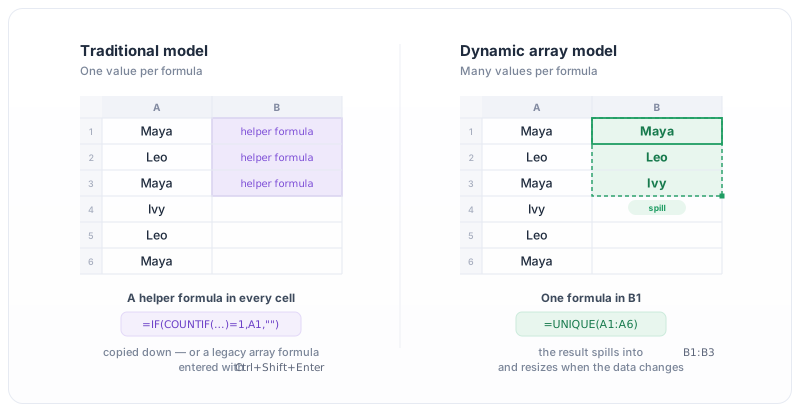
Figure 1. The traditional one-value-per-formula model compared with the dynamic array model. A single UNIQUE formula in B1 spills its results into B2 and B3.
Entered in a single cell, this returns the full list of unique values from A1:A6. The result fills as many cells as needed. If the source data changes and the number of unique values changes, the spill range grows or shrinks automatically. You can reference the entire spilled result elsewhere using the # operator, for example E2#.
This is not just a new function. It is a change in how the calculation engine handles the shape of a formula result.
Another effect of dynamic arrays: existing scalar functions such as UPPER, ROUND, and LEN now spill when given a range. =UPPER(A2:A10) in a single cell returns the uppercased array of nine values, whereas older Excel would have returned only UPPER(A2) via implicit intersection. This means the change affects not just the new function set, but how the entire formula library behaves.
New functions
Dynamic arrays come with a set of functions designed to return arrays:
UNIQUEreturns distinct values from a range.SORTandSORTBYreturn a sorted array.FILTERreturns rows that match a condition.SEQUENCEgenerates a sequence of numbers.
These functions compose. A single formula can filter, deduplicate, and sort in one step:
=SORT(UNIQUE(FILTER(A2:C100, B2:B100="Active")))
Alongside these, Excel added XLOOKUP, a modern replacement for VLOOKUP and HLOOKUP with a cleaner signature and better defaults. XLOOKUP normally returns a single value, but can return an array when its lookup argument is an array.
LET
LET allows you to assign names to intermediate values inside a formula. This improves readability and avoids recomputing the same subexpression multiple times:
=LET(total, SUM(B2:B100), tax, total*0.1, total+tax)
Without LET, the same calculation would repeat SUM(B2:B100) in several places.
Why users bring these to work
These features are not experimental. They ship in Excel 365 and Excel 2021, which are the versions most enterprise users have on their desktops today.
As a result, real workbooks now contain these formulas. Analysts write LET-based formulas because their team's existing files already use them. Finance and operations teams build reports around FILTER and UNIQUE. When these files are uploaded to a Java application that embeds a spreadsheet component, the users expect the same formulas to work in the browser the way they work on their desktop.
If the embedded engine does not support these formulas, the file either fails to calculate, shows errors in place of results, or silently produces the wrong output.
Where Java stands today: Apache POI
Apache POI is the default Excel library in the Java ecosystem. It is widely used for reading and writing .xlsx files, and it includes a formula evaluator.
However, POI's formula support is based on a fixed list of implemented functions. As of the most recent stable version, POI's own documentation states that around 200 built-in functions are implemented, with additional functions recognized by name but not evaluated. Attempting to evaluate an unimplemented function raises NotImplementedException.
The modern functions and behaviors described above are largely not implemented:
LET: not implemented.UNIQUE,SORT,SORTBY,FILTER,SEQUENCE: not implemented.- Dynamic array and spill behavior: not supported. POI's evaluation model assumes one formula returns one value into one cell. There is no concept of a spill range, no
#operator, and no automatic resizing of results.
In practice, this means that a workbook containing modern formulas can usually be opened structurally, but recalculation of those cells will fail or produce incorrect results. For applications that only display cached values from the file, this may be acceptable. For applications that let users edit the workbook and expect formulas to recalculate, it is not.
POI publishes the list of unsupported functions through its FunctionEval API, and its evaluation guide documents this limitation directly.
Why this is hard
Supporting modern Excel formulas is not only a matter of adding new function names to a list. The dynamic array model requires changes to the calculation engine itself.
A traditional formula engine assumes that each formula cell holds one value. Dependencies are tracked cell by cell. Recalculation updates one cell at a time.
A dynamic array engine has to handle several additional concerns:
- Array shaped results: a formula may return a 2D array whose dimensions depend on the input data. The engine must determine the shape at evaluation time.
- Spill range tracking: the engine must reserve the cells that a formula spills into, and prevent other formulas or values from occupying them. When they are occupied, the formula must return
#SPILL!rather than overwrite data. - Downstream references: expressions like
E2#refer to the entire spilled range. When the shape of the source formula changes, all downstream references must be re-evaluated with the new dimensions. - Implicit intersection changes: older Excel silently reduced arrays to single values in many contexts. Modern Excel returns the full array unless the formula uses the
@prefix. This changes how existing formulas behave.
Adding these behaviors to an engine designed around the one-formula, one-value model is a substantial rewrite. This is one reason why support for modern Excel behavior across the Java ecosystem has been limited.
Where Keikai fits
Keikai is a Java spreadsheet library. Keikai 7 supports dynamic array formulas and spill behavior directly in its calculation engine.
Supported behavior includes:
- Spill producing functions:
UNIQUE,SORT,SORTBY,FILTER,SEQUENCE,RANDARRAY. A single formula returns an array of values, and the result spills into the neighboring cells automatically. - The
#spilled range operator, for referencing an entire spilled result from other cells. #SPILL!handling when the target range is blocked by existing content, a merged region, or an Excel Table.@implicit intersection, so that Excel 365 formulas keep their original meaning when imported or entered directly.- Automatic array lifting for existing scalar functions: expressions like
=UPPER(A2:A10)return the array of uppercased values and spill into neighboring cells, the same way native dynamic array functions do. XLOOKUPandXMATCHextended with dynamic array support: they return an array (which spills) when given a range of lookup values.- Round trip with
.xlsx: spilled formulas can be imported from and exported back to Excel files without losing their behavior.
Keikai 7 also recognises the wider Excel 365 function family, including XLOOKUP, XMATCH, LET, LAMBDA, CHOOSECOLS, CHOOSEROWS, DROP, EXPAND, HSTACK, VSTACK, TAKE, TOCOL, TOROW, WRAPCOLS, WRAPROWS, BYROW, BYCOL, MAKEARRAY, MAP, REDUCE, SCAN, TEXTAFTER, TEXTBEFORE, TEXTSPLIT, VALUETOTEXT, ARRAYTOTEXT, and the newer GROUPBY and PIVOTBY aggregation functions. Functions in this list that return more than one value spill the same way as the core dynamic array functions.
Some of these were introduced in Keikai 6.3. The remaining functions and the underlying spill behavior are part of Keikai 7's rebuilt calculation core.
In practice, this means a workbook that uses modern Excel formulas can be opened in a Keikai-based web application and behave the same way it does on the user's desktop. Formulas do not need to be rewritten, and users do not need to fall back to legacy patterns.
For the complete list of supported functions and details on dynamic array behavior, see the Keikai 7 documentation.
Closing
Excel's formula language is no longer just a grid of numbers with simple functions. Dynamic arrays, LET, and the new function set change how formulas are written and how the calculation engine has to work internally.
For Java applications that embed a spreadsheet component, the choice of engine determines whether users can bring their existing Excel work directly to the browser, or whether they have to adapt their files to fit the limits of the library.
Keikai 7 supports the modern behavior. You can try it in the Keikai 7 live demo or read the Keikai 7 release notes for the full list of supported functions.