Meet Keikai 7 Beta

Modern Excel Compatibility, Fidelity, and Performance

Keikai 7 introduces a next-generation spreadsheet core with improved formula compatibility, chart fidelity, faster editing performance, and support for modern Excel behaviors.

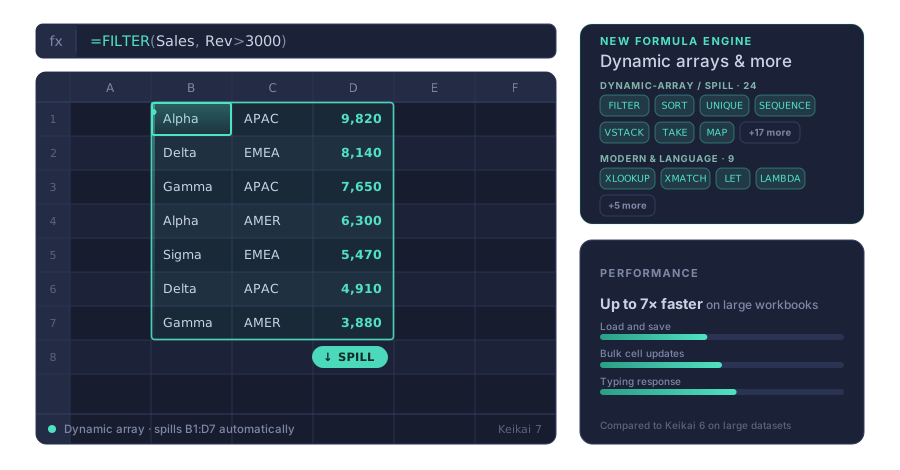
Keikai 7 spreadsheet illustration showing FILTER and UNIQUE dynamic array formula support

What's New in Keikai 7

Rather than changing existing frontend workflows, Keikai 7 focuses on resolving practical compatibility and fidelity limitations that enterprise users commonly encounter when working with modern Excel files.

Modern Dynamic Arrays & Formula Support

Support for 50+ new formulas including dynamic arrays, LAMBDA, and the latest Excel additions.

  • UNIQUE, FILTER, SORT, and 20+ dynamic-array functions
  • LET and LAMBDA for reusable formula logic
  • Including recent additions like GROUPBY and PIVOTBY
  • XLOOKUP and XMATCH extended with dynamic array (spill) support
  • Automatic array lifting: scalar functions like UPPER, ROUND, LEN spill when given a range

Improved Chart & Layout Fidelity

Preserve spreadsheet visuals more accurately during import and export.

  • Better chart fills and borders
  • Enhanced chart field handling
  • Freeze pane coordinate handling

Performance

Faster loading, saving, and bulk operations on large workbooks.

  • Up to ~7× faster opening real Excel files (native engine trusts cached values)
  • Up to ~3× faster saving large or formula-dense workbooks
  • ~6× faster bulk cell updates (1M cells)
  • More responsive typing and reduced input lag

Feature Comparison

Key improvements in compatibility and spreadsheet behavior.

Capability Previous Version Keikai 7 Enterprise Value
Formula Support 400+ built-in formulas 503 formulas - 50+ new including LAMBDA family, GROUPBY, PIVOTBY, and dynamic arrays Handles a wider range of modern Excel workbooks
Dynamic Arrays Standard formula support Adds the Excel 365 dynamic array, lookup, and LAMBDA function family — FILTER(), UNIQUE(), XLOOKUP(), LET(), LAMBDA(), and more Enables modern Excel modeling workflows
Visual Fidelity Solid chart and layout rendering for standard use cases Enhanced chart fill and border rendering Better presentation consistency
Workbook Performance Reliable editing experience for typical spreadsheet use Up to ~7× faster file open, ~3× faster save, ~6× faster bulk updates; more responsive typing Faster load times and smoother interactive workflows
Platform Foundation Proven, stable architecture widely used in production Next-generation spreadsheet core built for modern Excel behaviors Stronger foundation for future extensibility

Upgrade Path

Designed for Low-Risk Migration

Most applications need no code changes — bump the Keikai version and the native engine arrives automatically as a transitive dependency. The APIs you already use (io.keikai.api.*, io.keikai.ui.*, the Spreadsheet ZUL widget) are unchanged. Two requirements apply to every upgrade: Java 17 or later, and a supported server platform.

Have Advanced Customizations?

Migration adjustments may be needed if your application:

  • imports org.apache.poi.* classes to plug into Keikai (custom formula functions)
  • calls the HTML/PDF exporter classes directly, or configures PdfExporter programmatically (paper size, margins, per-sheet export)

If any of these apply, our team can help evaluate compatibility and walk through the migration path.

Built for Future Spreadsheet Capabilities

Keikai 7 introduces a modernized spreadsheet core designed to better support evolving Excel behaviors and future enterprise spreadsheet features.